olatoto Mobile App
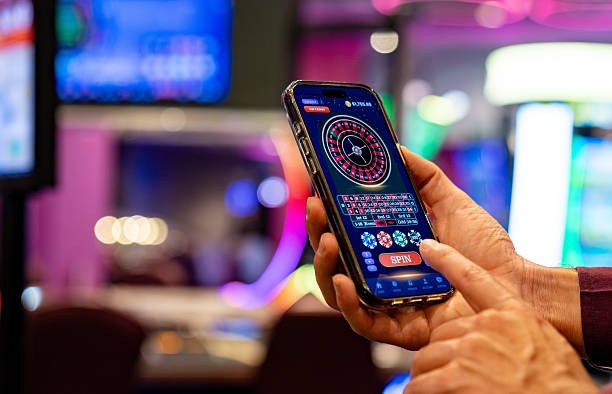
We offer olatoto as a mobile app for Android and as a web app accessible on iOS and desktop browsers. Our mobile-first design lets you access sportsbook betting, live casino games, slots, and esports markets from anywhere. Whether you are in Jakarta, Surabaya, Bandung, or Medan, the olatoto app brings Liga 1, Piala AFF, Champions League, and live blackjack, roulette, and baccarat to your device.

- and
- Update
- StartFirst Game
The olatoto app is built for speed and convenience. You can deposit via e-wallet, mobile banking, local payment, or bank virtual accounts, place bets on football and other sports, play live casino games, and withdraw your winnings — all from your phone. The app works offline for some features and sends push notifications for live updates on your favourite matches and games.
Our services are available only where local law permits. Users are responsible for verifying that access and use comply with their own jurisdiction's law. Download the olatoto app today and start exploring our full range of sportsbook and casino offerings.
How to Get the olatoto App
We provide olatoto through three main paths: Android APK download, iOS web app, and desktop web browser. Each method is secure and connects to the same olatoto account. Choose the option that works best for your device.
Installation Steps
- Download: Visit olatoto.app or scan the QR code to download the Android APK or access the web app.
- Install: On Android, enable "Unknown sources" in Settings, then tap the APK file to install. On iOS, add olatoto to your home screen via Safari.
- Register: Open the app, create your account with email, password, and mobile number, then verify your email.
- Start: Deposit via DANA, e-wallet, mobile banking, or bank transfer, then explore sportsbook betting, live casino, slots, and esports markets.

App vs Browser: What You Get
The olatoto app offers several advantages over the web browser. The app caches some data locally, so you can view your account balance and recent bets even without an internet connection. Push notifications alert you when a Liga 1 match starts, when a live casino table opens, or when your withdrawal is processed. The app also loads faster than the browser because it does not need to refresh the entire page each time. On the other hand, the web browser requires no installation and works on any device with a modern browser. Choose the app for speed and notifications, or use the browser for simplicity.
Device Compatibility
The olatoto Android app requires Android 7.0 or later. Most phones released in the last five years meet this requirement. On iOS, the web app works on iOS 12 and later, which covers most iPhones and iPads. If your device is older, you can still access olatoto via the web browser on desktop or laptop. We recommend updating your device to the latest operating system for the best security and performance.
Troubleshooting Installation Issues
If you cannot install the Android APK, check that "Unknown sources" is enabled in your device Settings under Security. Some devices require you to trust the olatoto certificate before installation. If the app crashes after installation, try clearing the app cache in Settings or reinstalling the app. If you see a warning about the app being unsigned, this is normal for APK files downloaded outside the Google Play Store — olatoto APKs are safe and verified. On iOS, if the web app does not save to your home screen, try using Safari instead of Chrome and ensure you have enough storage space.
Data, Permissions, and Account Security
The olatoto app requests permission to access your device's camera (for identity verification during KYC), microphone (for live chat support), and location (to detect your approximate region for compliance purposes). We do not share these permissions with third parties. Your account data is encrypted in transit using SSL/TLS, and your password is never stored in plain text on your device. We recommend enabling two-factor authentication in your account settings for extra security. If you lose your phone, log in to olatoto.app from another device and change your password immediately to prevent unauthorized access.
Key takeaways
- Download the olatoto app for Android or use the web app on iOS and desktop
- Installation takes a few minutes; enable "Unknown sources" on Android first
- The app offers push notifications, offline account view, and faster loading
- Android 7.0+ and iOS 12+ are supported; older devices can use the web browser
- Enable two-factor authentication for extra account security
Getting Started with olatoto
Once you have installed the olatoto app, your first step is to create an account. Enter your email, choose a strong password, and provide your mobile number. We will send a verification code to your email — enter it to confirm your account. Next, deposit funds using DANA, e-wallet, mobile banking, local payment, online payment, e-wallet, or a bank virtual account (mobile banking, local payment, online payment, e-wallet). Your first deposit may require identity verification (KYC) — upload a photo ID and proof of address, and we will verify them within hours. After verification, you can withdraw your winnings at any time.
Explore our full range of offerings on the olatoto app. Bet on Liga 1, Piala Indonesia, Piala AFF, Piala Asia, and Champions League matches. Play live blackjack, roulette, baccarat, and Dragon Tiger with live dealers. Spin slots like Aviator, Sweet Bonanza, Gates of Olympus, Fortune Tiger, and Mahjong Ways. Place esports bets on Mobile Legends, Free Fire, and PUBG Mobile. Use the search function to find your favourite games quickly, and set notifications for upcoming matches and events.
Our support team is available via live chat and email to help with account issues, payment questions, or technical problems. We offer English-language support and aim to respond within a few hours during business hours. If you have questions about our terms, privacy policy, or legal notice, visit our Terms & ConditionsPrivacy Policyor Legal Notice pages. Our services are available only where local law permits — users are responsible for verifying compliance with their own jurisdiction's law.